Magpie Laser Engrave File
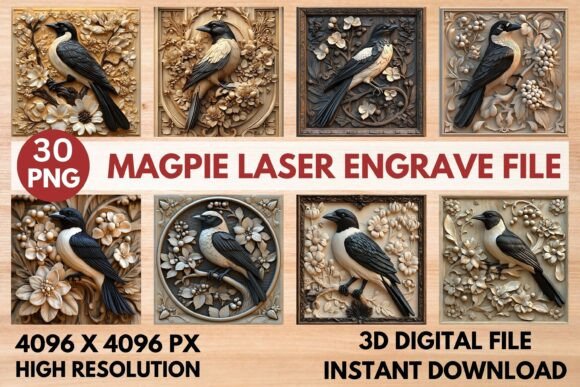
The Magpie Laser Engrave File is a high-resolution grayscale PNG designed specifically for laser engraving projects. This detailed 3D design offers a unique way to add artistic flair to a wide range of materials, making it a valuable tool for creators and hobbyists alike. Whether you're working on woodwork, home décor, stationery, or textiles, this file provides the precision and clarity needed for professional results.
Created with laser machines in mind, the Magpie Laser Engrave File ensures crisp and accurate engravings. Its 4096 x 4096 pixel resolution allows for intricate details that stand out on various surfaces. The transparent background makes it easy to integrate into different designs, while the grayscale format enhances depth and dimensionality. This makes it ideal for both beginners and experienced users looking to elevate their craft.
Why Choose the Magpie Laser Engrave File?
The Magpie Laser Engrave File stands out due to its versatility and quality. It is optimized for use with popular laser engraving software such as LightBurn, xTool, Glowforge, Sculpfun, and CO₂ laser machines. This compatibility ensures that users can achieve impressive results regardless of their preferred platform. The file's grayscale mode allows for varying power settings, which is essential for achieving the best engraving quality on different materials.
For those using Glowforge, the recommended settings include a speed of 1000, power of 90, and a grayscale mode with max quality and 270 lines per inch. These settings help maintain detail and clarity while ensuring efficient processing. LightBurn users will appreciate the Jarvis dither filter used in the PNG, which enhances the grayscale effect for more natural and realistic results.
The file is not editable, but users can resize it as needed to fit their project requirements. This flexibility makes it suitable for a variety of applications, from small personal projects to larger commercial endeavors. The absence of a mask also means that users can focus on the design itself without worrying about additional layers or complexities.
Creative Possibilities with the Magpie Laser Engrave File
The Magpie Laser Engrave File opens up a world of creative possibilities. Its detailed design can be used to enhance wooden furniture, create custom signs, or add unique patterns to fabric and paper. The 3D grayscale effect adds a sense of depth that can transform ordinary objects into eye-catching pieces.
For example, a designer might use the file to create personalized gifts such as engraved cutting boards, wooden coasters, or custom phone cases. A small business owner could incorporate the design into packaging or promotional items, adding a touch of sophistication that sets their products apart. The file's high resolution ensures that even the smallest details are visible, making it perfect for intricate work.
Another application could be in home décor, where the Magpie Laser Engrave File can be used to create wall art, decorative panels, or custom mirrors. The ability to adjust power settings allows users to control the depth and contrast of the engraving, enabling them to achieve different visual effects. This adaptability makes the file suitable for a wide range of styles and preferences.
Adapting the File for Different Goals and Audiences
Users can tailor the Magpie Laser Engrave File to suit their specific goals and target audiences. For instance, a marketer might use the design to create branded merchandise that resonates with a particular demographic. By adjusting the size and placement of the engraving, they can ensure that the design aligns with their brand identity and messaging.
Similarly, an educator could use the file to teach students about laser engraving techniques and design principles. The file's clear structure and high-quality output make it an excellent teaching tool, allowing students to experiment with different settings and observe the results. This hands-on approach can help develop practical skills and foster creativity.
Hobbyists and DIY enthusiasts can also benefit from the Magpie Laser Engrave File by using it to personalize their projects. Whether it's adding a unique touch to a handmade gift or creating a custom piece for their home, the file offers endless opportunities for self-expression. Its ease of use and high-quality output make it accessible to users of all skill levels.
Practical Tips for Using the Magpie Laser Engrave File
To get the most out of the Magpie Laser Engrave File, it's important to follow best practices for laser engraving. Start by testing the file on a small area of the material to ensure that the settings produce the desired effect. Adjust the power and speed as needed to achieve the right balance between detail and durability.
When working with light-colored wood, the file tends to produce the best results due to the contrast between the engraving and the material. However, users can experiment with different materials and colors to find the combination that works best for their project. Keeping a record of the settings used for each project can help replicate successful outcomes in the future.
It's also a good idea to clean the material before engraving to remove any dust or debris that could affect the quality of the result. Using a high-quality laser machine and following the manufacturer's guidelines can further enhance the engraving process. By taking these steps, users can ensure consistent and professional-looking results every time.
The Magpie Laser Engrave File is a powerful tool for anyone involved in laser engraving. Its high-resolution design, grayscale format, and compatibility with various software make it a valuable asset for creators, hobbyists, and professionals. Whether you're looking to add a unique touch to your projects or explore new creative avenues, this file offers the flexibility and quality needed to bring your ideas to life. With the right approach and attention to detail, the Magpie Laser Engrave File can help you achieve stunning and original results.