Leaf Laser Engrave File: A Versatile Tool for Creative Projects
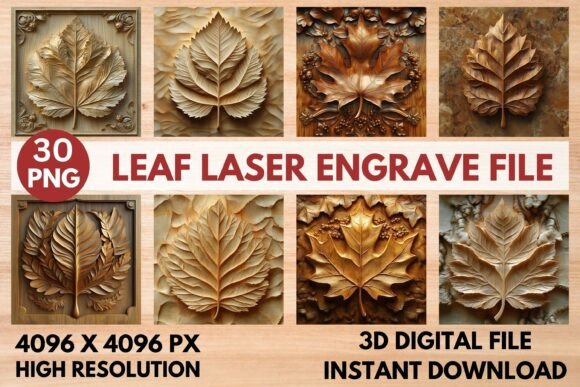
The Leaf Laser Engrave File is a high-quality digital design that opens up a world of creative possibilities for both hobbyists and professionals. This beautifully crafted leaf design is optimized for laser engraving, making it ideal for a wide range of applications, from home décor to commercial products. With its detailed grayscale and coloring versions, this file offers flexibility and precision for users looking to bring their ideas to life.
What Makes the Leaf Laser Engrave File Unique?
The Leaf Laser Engrave File stands out due to its exceptional resolution and compatibility with various laser engraving tools. Each PNG file is 4096x4096 pixels, ensuring that every detail is captured with clarity and depth. The transparent background allows for easy integration into different projects, while the high-resolution format ensures that the design remains sharp even when resized.
One of the key features of this file is its versatility. It includes 15 coloring PNGs and 15 grayscale PNGs, giving users the freedom to choose between vibrant colors or subtle tones depending on their project needs. Whether you're creating custom stationery, wood engravings, or textiles, the Leaf Laser Engrave File provides a solid foundation for your creative vision.
Compatibility and Recommended Settings
This file is designed with laser machines in mind, making it compatible with popular software such as LightBurn, Glowforge, xTool, Sculpfun, and CO2 laser cutters. Its format ensures smooth operation across different platforms, allowing users to focus on their work without technical interruptions.
For those using Glowforge, the recommended settings include a speed of 1000, power of 90, and grayscale varying power for optimal results. For LightBurn users, the grayscale PNGs paired with the Jarvis dithering filter produce the best outcomes. These guidelines help ensure that the design is engraved with precision and quality, regardless of the machine being used.
Applications and Use Cases
The Leaf Laser Engrave File can be applied to a variety of materials and products. Home décor enthusiasts might use it to create personalized wooden signs, wall art, or decorative items. For textile artists, the design can be transferred onto fabric for unique clothing prints or accessories. Tableware designers could engrave the leaf pattern onto plates, mugs, or cutting boards, adding an elegant touch to everyday items.
Business owners and online sellers can also benefit from this file by offering customized products to their customers. Whether it's packaging, stationery, or promotional items, the Leaf Laser Engrave File provides a professional and polished look that enhances the appeal of any product.
Who Can Benefit from the Leaf Laser Engrave File?
This file is suitable for a wide range of users, including DIY enthusiasts, crafters, and professionals in the engraving industry. Beginners can use it to learn the basics of laser engraving, while experienced users can leverage its high-resolution details for more complex projects. Its ease of use and adaptability make it a valuable tool for anyone interested in creative design and customization.
For those looking to expand their product offerings, the Leaf Laser Engrave File offers a cost-effective solution. Instead of purchasing multiple designs, users can access a comprehensive set of files that can be used across different materials and projects. This not only saves time but also reduces the need for additional purchases.
Considerations and Practical Expectations
While the Leaf Laser Engrave File is highly versatile, it's important to note that it is a digital PNG file only. No physical product will be shipped, so users must have the necessary equipment and software to utilize the design effectively. Additionally, the file is not editable, meaning that users may need to resize it based on their specific requirements.
Understanding the limitations of the file is essential for setting realistic expectations. The design is optimized for laser engraving, so it may not be suitable for other types of printing or cutting methods. Users should also consider the material they are working with, as different surfaces may require adjustments in settings or techniques to achieve the desired result.
Real-World Examples and Inspiration
Imagine a small business owner who wants to create custom wooden coasters for their shop. By using the Leaf Laser Engrave File, they can easily add a unique leaf pattern to each coaster, making them stand out among competitors. Similarly, a textile artist could use the coloring versions of the file to create a series of handcrafted tote bags with intricate leaf designs, appealing to eco-conscious consumers.
Another example is a wedding planner who wants to personalize table numbers or place cards. The Leaf Laser Engrave File can be used to create elegant, custom designs that match the theme of the event. This level of customization adds a personal touch that enhances the overall experience for guests.
Evaluating Suitability for Your Projects
When considering whether the Leaf Laser Engrave File is right for your needs, it's important to assess your project requirements and available resources. If you have access to a laser engraver and the necessary software, this file can be a valuable addition to your toolkit. However, if you're new to laser engraving, you may need to invest time in learning how to use the software and equipment effectively.
Additionally, think about the type of materials you plan to engrave. Some materials may require specific settings or techniques to achieve the best results. Testing the file on a small scale before committing to a larger project can help identify any potential issues and ensure that the final outcome meets your expectations.
Ultimately, the Leaf Laser Engrave File offers a powerful combination of quality, versatility, and practicality. Whether you're a seasoned professional or just starting out, this file provides the tools needed to bring your creative ideas to life. With its detailed design and broad range of applications, it's a valuable resource for anyone passionate about laser engraving and custom design.